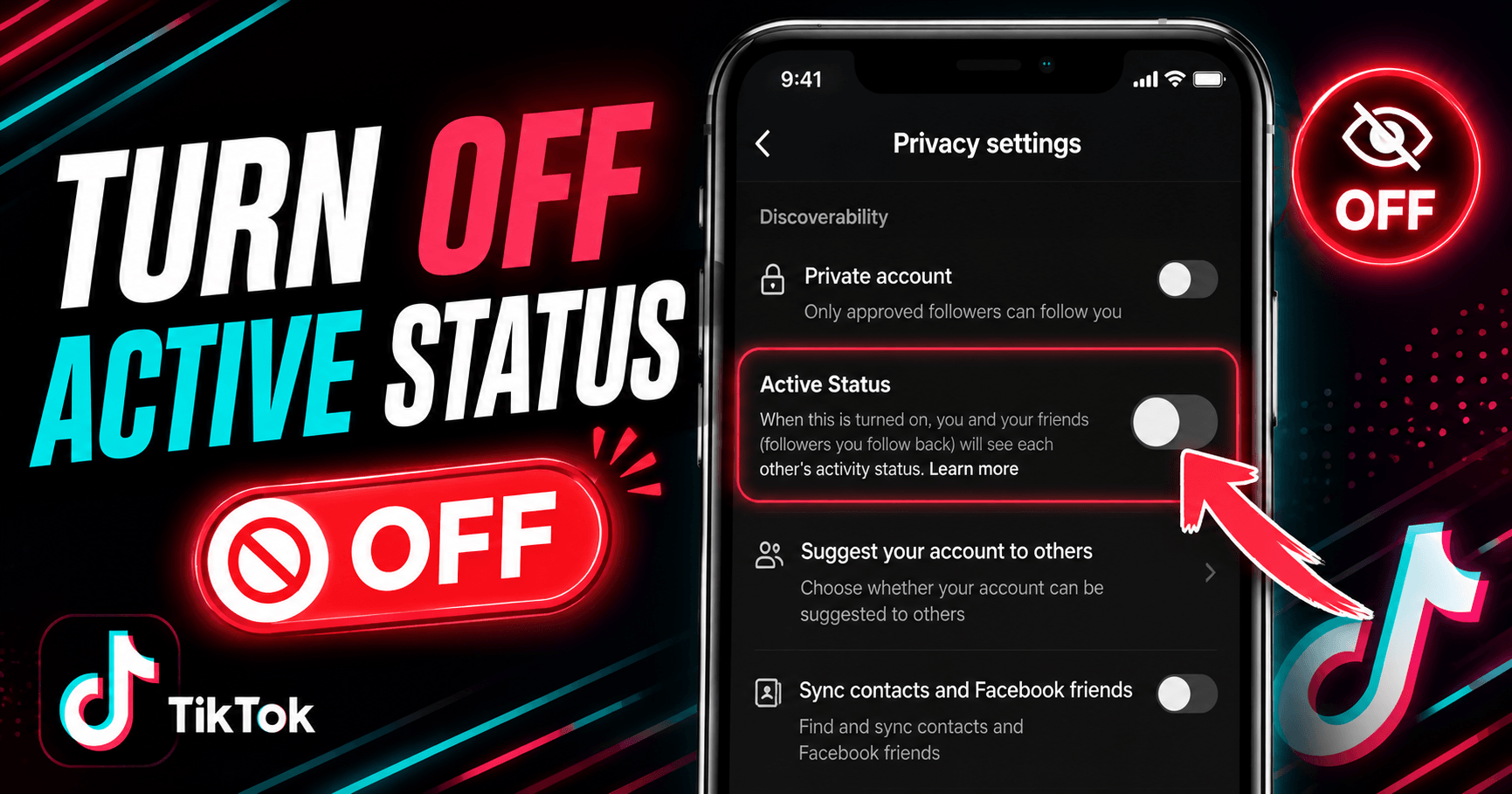
Go to your TikTok profile, tap the menu icon (☰), then go to Settings and Privacy → Privacy → Active Status and toggle it off. That’s the whole process, and it takes less than 30 seconds and works the same way on iPhone and Android.
One thing to understand before you do it: turning off your active status is mutual. Once it is off, you won’t be able to see when other people are active either. TikTok doesn’t let you hide yourself while still seeing everyone else.
What “Active Status” Actually Means on TikTok
Active status is a green dot that appears next to your profile picture in the Direct Messages inbox. When it’s showing, anyone you’ve messaged before can see that you’re currently using the app. It doesn’t appear on your public profile or on your videos, only in DMs, and only to people you’ve already had a conversation with.
This matters because a lot of people assume active status is visible to all their followers or anyone who visits their profile. It’s not. The green dot only shows to existing DM contacts. If you’ve never messaged someone, they can’t see your active status regardless of your settings.
Still, DM contacts can include people you’d rather not broadcast your online habits to, like an ex, a coworker, or someone you messaged once about a collaboration that went nowhere. That’s a reasonable thing to want control over.
How to Turn Off Active Status on TikTok
The path is the same whether you’re on iPhone or Android:
1. Open TikTok and tap Profile (the person icon at the bottom right)
2. Tap the menu icon (☰) in the top right corner
3. Select Settings and Privacy
4. Tap Privacy
5. Tap Active Status
6. Toggle Show Active Status off
Alternatively:
1. Open TikTok and tap Inbox.
2. From the top tap on the green active status icon.
3. Select No one from the “who can see when you’re active” options.
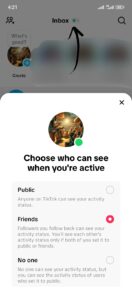
The change takes effect immediately. No confirmation prompt, no waiting period — as soon as the toggle is off, your green dot disappears from your contacts’ DM inboxes.
If you want to turn it back on later, follow the same path and toggle it back. There’s no limit on how many times you can switch it.
The Trade-Off: You Lose Visibility Too
This is the part most articles skip over, and it’s worth understanding before you commit.
When you disable your active status, TikTok also hides everyone else’s status from you. This means you will not be able to see the green dot next to any of your contacts’ names. If you are used to timing messages around when someone is online, that will no longer be possible.
In practice, most people turn this off and don’t miss the visibility feature at all. Active status in TikTok DMs is much less central to how people use the app than it is on WhatsApp or Instagram. TikTok is primarily a content platform, not a messaging one.
Does Turning Off Active Status Affect Anything Else?
No, and this surprises some people. Disabling active status has no effect on:
- Your content visibility. Your videos still appear on the For You page and your followers’ feeds exactly as before.
- Your DM functionality. You can still send and receive direct messages normally. The setting only controls the green dot indicator, not the messaging feature itself.
- Your follower count or profile. Nothing on your public-facing profile changes.
- Notifications. People can still message you and you’ll still get notified. They won’t be able to tell when you’re currently in the app.
The only thing that changes is the green dot in the DM inbox, yours disappears from theirs, and theirs disappears from yours.
Can People Still Tell You’re Online Without the Green Dot?
Mostly no, but with a couple of nuances worth knowing.
If you are actively live streaming, that’s publicly visible, so TikTok shows your live to followers and the live tab. Turning off active status doesn’t hide the fact that you’re live, because a live stream is by definition a public broadcast.
If you comment on a video or post new content while someone is watching, they can see it and know that you’re active in the moment.
For general DM-based activity, which is what active status actually tracks, turning the feature off effectively makes your online presence invisible to your contacts. Nobody in your DM inbox can see a green dot next to your name, and TikTok doesn’t provide any alternative signal to replace it.
Frequently Asked Questions (FAQs)
Can people see when you’re active on TikTok?
Yes, by default. TikTok shows a green dot next to your profile picture in the Direct Messages inbox when you’re currently using the app. This is only visible to people you’ve had a DM conversation with, it doesn’t appear on your public profile or to your general followers. You can turn it off in Settings and Privacy → Privacy → Active Status.
What happens when you turn off active status on TikTok?
Your green dot disappears from the DM inboxes of anyone you’ve messaged. They can no longer see when you’re online. The trade-off is that you also lose the ability to see other people’s active status — TikTok makes the setting mutual, so you can’t hide yourself while still seeing others.
Does TikTok show your active status to everyone or just followers?
Only to people you’ve exchanged direct messages with, not your general followers, not random visitors to your profile, and not anyone who hasn’t had a DM conversation with you. Active status is strictly a DM inbox feature.
Can you see if someone turned off their active status on TikTok?
No. If someone has disabled their active status, their green dot simply doesn’t appear in your DM inbox. TikTok doesn’t tell you whether the absence of a green dot means they’re offline or that they’ve hidden their status. You can’t tell the difference.
Does turning off active status on TikTok affect your DMs?
No. Your direct messages work exactly the same, you can send and receive messages, get notifications, and have conversations normally. The only thing that changes is the green dot visibility indicator. Turning off active status doesn’t mute, restrict, or disable your DM inbox in any way.
Quick Reference
| Question | Answer |
|---|---|
| Where is the setting? | Settings and Privacy → Privacy → Active Status |
| Works the same on iPhone and Android? | Yes — identical path on both |
| Who can see your active status by default? | Only DM contacts (people you’ve messaged before) |
| Does turning it off affect followers or content? | No — only affects the green dot in DMs |
| Can you still see others’ active status after turning yours off? | No — the setting is mutual |
| Can someone tell you’ve hidden your status? | No — they just see no green dot |
| Does it affect DM functionality? | No — messaging works exactly the same |
 Share this post