Auto scroll on TikTok moves you to the next video automatically once the current one finishes, so you don’t have to swipe. To turn it on, press and hold anywhere on a video in your For You feed until a small menu pops up, then tap Auto Scroll. No settings menu digging required since the toggle lives right on the video itself.
That’s the whole process. The part people actually get stuck on is that this menu does not appear for everyone, and no amount of searching through Settings and Privacy will fix that. Here is how the feature really works, and what to do if yours isn’t showing up.
Turning On Auto Scroll, Step by Step
1. Open TikTok and go to your For You page.
2. Press and hold on the video that’s currently playing (not a quick tap, hold for about a second).
3. A small ribbon or pop-up menu appears over the video with a handful of options.
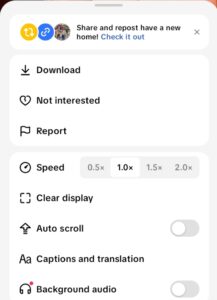
4. Tap Auto Scroll from that menu.
5. The video finishes playing, then the app advances to the next one on its own.
You will know it’s working because a small icon (usually a downward arrow or a looping symbol) shows up in the corner of the screen while the feed auto-advances. Hold the video again and tap Manual Scroll to switch back to swiping whenever you want.
This is a per-session toggle, not a permanent account setting. Close the app or restart your phone, and you’ll likely need to turn it back on next time you open TikTok. That trips people up, they turn it on once, come back the next day, and assume the feature “disappeared” when really it just reset.
Why Auto Scroll Might Not Show Up for You
If you press and hold on a video and there’s no Auto Scroll option in the menu at all, it’s not a bug on your end most of the time, it’s a rollout issue. TikTok tests features like this on a portion of its user base before pushing them to everyone, which means two people with the same phone model and app version can have completely different menus.
A few things actually do affect whether you get it:
App version
An outdated build of the app is the most common reason the option is missing. Update through the App Store or Google Play and reopen the app.
Account region
TikTok rolls features out by market, so availability can lag in some countries even after it’s common elsewhere.
Device age
Very old phones running outdated operating systems sometimes can’t render the newer interaction menu at all.
The one thing that won’t fix it: digging through Settings, Accessibility, or Content Preferences looking for a permanent toggle. Some low-quality guides describe a settings-based switch for this feature, that’s not how it currently works. If it’s available to your account, it lives on the video’s press-and-hold menu, full stop.
Auto Scroll vs. Autoplay (They Are Not the Same)
People often confuse the two. Autoplay is the general behavior of TikTok’s video player automatically starting playback when a clip loadsthat’s been standard on the platform for years and isn’t something you toggle. Auto scroll goes a step further: it advances between videos without you swiping at all. You can have autoplay on and still be swiping manually between videos, which is the default state for most accounts.
One Thing Worth Knowing Before You Turn It On
Auto scroll is convenient for hands-free viewing, but it also removes the natural pause point where you’d normally decide whether to keep watching. If you’ve ever looked up from TikTok and lost twenty minutes without meaning to, auto scroll will make that easier to do, not harder. Worth keeping in mind if you’re using it during something like a workout or a commute where you actually want a reason to look up occasionally.
Frequently Asked Questions (FAQs)
How do I turn on auto scroll on TikTok?
Press and hold on any video in your For You feed until the menu appears, then tap Auto Scroll. It applies immediately and stays on until you turn it off or close the app.
Why don’t I have auto scroll on TikTok?
It’s most likely a staged rollout, TikTok hasn’t enabled the feature for your account yet. Updating the app and checking again after a few days resolves it for most users; a persistently missing option on a fully updated app usually points to regional availability rather than a setting you’ve missed.
How do I turn off auto scroll on TikTok?
Press and hold on the video again and tap Manual Scroll from the same menu. You can switch back and forth as often as you like within a session.
Does TikTok auto scroll work on Android and iPhone?
Yes, once TikTok has rolled the feature out to your account, it works the same way on both platforms, press and hold, then tap Auto Scroll. Availability by rollout stage matters more than the operating system itself.
Is auto scroll the same as autoplay?
No. Autoplay starts a video automatically once it loads. Auto scroll goes further and advances to the next video for you, without a swipe, once the current one ends.
 Share this post