

If you want to delete your Twitter account, now officially rebranded as X, this guide is all you need. Before you get started, note that Twitter gives you a 30-day deactivation window before your account gets permanently deleted. During those 30 days, you can still log back in and cancel. After that, your account, tweets, followers, and data are gone for good.
In this guide, we will cover how to delete your Twitter account on desktop and mobile, what happens to your data, and what you should do before you hit that delete button.
The account deletion process on Twitter (rebranded as X) is straightforward, but there are a few things worth knowing upfront. You can only deactivate, not immediately delete your account. The permanent deletion happens automatically after 30 days of inactivity. If you log back in during that window, deactivation is cancelled, and your account is fully restored. So once you decide to go, stay logged out.
How to Delete Your Twitter Account on Desktop
1. Log in to your account at [x.com](https://x.com)
2. Click on More in the left sidebar (the three-dot icon).
3. Go to Settings and privacy.
4. Click Your account.
5. Select “Deactivate your account.”
6. Read the information on the deactivation page, then click Deactivate.
7. Enter your password when prompted.
8. Click Deactivate account to confirm.
That is it. Your account is now deactivated. Twitter will permanently delete it after 30 days.
How to Delete Your Twitter Account on iPhone (iOS)
1. Open the X app on your iPhone.
2. Tap your profile icon in the top-left corner.
3. Go to Settings and Support → Settings and privacy.
4. Tap Your account.
5. Tap Deactivate your account.
6. Tap “Deactivate” at the bottom of the screen.
7. Enter your password to confirm.
How to Delete Your Twitter Account on Android
1. Open the X app on your Android device.
2. Tap your profile picture in the top-left.
3. Select Settings and Support → Settings and privacy.

4. Tap Your account.
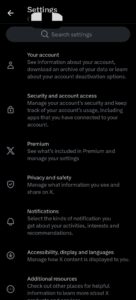
5. Tap Deactivate Account.

6. Tap Deactivate and enter your password.

7. Confirm by tapping “Deactivate account.”
The steps are nearly identical across iOS and Android. The app layout may look slightly different depending on your version, but the path is the same.
What Happens After You Deactivate Your Twitter Account?
Here’s what to expect once you hit deactivate:
| What happens | Timeline |
|---|---|
| Your profile goes private | Immediately |
| Your tweets, likes, and replies disappear from public view | Immediately |
| Your username becomes unavailable to others | During the 30-day window |
| Permanent deletion of all data | After 30 days |
| Your username becomes available again | After 30 days |
A few important things to know:
Retweets of your tweets may still appear temporarily for other users even after deactivation. Twitter cleans these up over time.
Twitter/X may retain some data for legal, safety, or business reasons even after deletion. Check their Privacy Policy for specifics.
Third-party apps you authorized with your Twitter login are not automatically revoked. You’ll want to disconnect those separately.
Also check out this guide on How to Check If X Twitter Username Is Available
What to Do Before You Delete Your Twitter Account
Before you rush the process. Take these steps first:
1. Download Your Twitter Data Archive
Go to Settings → Your account → Download an archive of your data. Twitter will email you a link to download everything which includes your tweets, DMs, media, and account history. This can take up to 24 hours.
2. Revoke Third-Party App Access
Go to Settings → Security and account access → Apps and sessions → Connected apps. Remove any apps you no longer use or don’t want linked to your account.
3. Remove Your Email and Phone Number (Optional)
If privacy is your concern, you can remove your phone number and change your email to a throwaway before deactivating. This limits the data Twitter holds on your identity post-deletion.
4. Notify Your Followers (If Relevant)
If you have an audience you care about, let them know where they can find you before you leave. Post your last update with links to other platforms.
5. Unlink Twitter from Other Services
If you used Twitter to log into other apps or websites (Spotify, Medium, etc.), update those logins before your account disappears.
How to Temporarily Deactivate Twitter Instead of Deleting It
Not ready to delete permanently? You can deactivate your account and leave it dormant. Follow the same steps above, but log back in before the 30-day window closes.
Your account, tweets, and followers will be fully restored when you reactivate. Twitter treats logging back in as cancellation of the deactivation request.
Can You Delete a Twitter Account Without the Password?
If you have lost access to your account, deleting it is harder but not impossible. Here are your options:
Reset your password
Go to the Twitter login page and click Forgot password. You can reset via email or phone number.
Contact Twitter Support
If you no longer have access to the email or phone number on the account, submit a support request at [help.twitter.com](https://help.twitter.com). Twitter may be able to verify your identity and help you regain access.
Report the account
If the account is yours but fully inaccessible, some users have had success reporting it as compromised through Twitter’s help center.
There is no shortcut here. Twitter does not allow third-party deletion of accounts without authentication.
How to Delete a Twitter Account for Someone Who Has Died
Twitter has a process for deactivating accounts of deceased users. A family member or authorised representative can submit a request through Twitter’s Help Center.
You will need to provide:
- Your full name and relationship to the deceased
- The Twitter username of the account
- A copy of the death certificate (in some cases)
Twitter reviews these requests case by case. They do not hand over account access to third parties, but they can deactivate or memorialize the account.
How Long Does It Take for Twitter to Delete Your Account Permanently?
Twitter permanently deletes your account 30 days after deactivation, provided you don’t log back in during that period.
After the 30-day mark:
- Your profile, tweets, likes, and DMs are deleted from Twitter’s systems.
- The process may take additional time on Twitter’s backend for full removal from all servers.
Google and other search engines may still cache your profile for a period after deletion. This clears up over time as search engines re-crawl and update their indexes.
Frequently Asked Questions (FAQs)
Can I recover my Twitter account after deletion?
Yes, but only within the 30-day deactivation window. Log back in at any point before the 30 days are up, and your account is restored. After 30 days, it is gone permanently.
Does deleting Twitter delete all my tweets?
Yes. Once the 30-day period ends and Twitter permanently deletes your account, all your tweets, replies, likes, and media are removed from the platform.
What happens to my Twitter username after I delete my account?
Your username stays reserved for the 30-day deactivation window. After that, it becomes available for others to claim.
Can I delete my Twitter account but keep my phone number?
Yes. Twitter does not hold on to your phone number in a way that prevents you from using it on another account. Once your account is deleted, you can use that phone number to register a new account if you want.
Does deactivating Twitter remove it from Google search results?
Not immediately. Google’s index takes time to update. After your account is permanently deleted, submit a removal request through Google’s Remove Outdated Content tool to speed up the process.
Can I delete my Twitter account from a browser instead of the app?
Yes. The desktop process through x.com works the same way as the app. Many users actually find it easier to do on a browser.
Conclusion
Deleting your Twitter account takes less than five minutes. The actual hard part is waiting 30 days for the permanent deletion to kick in and staying logged out during that time.
Before you go, download your data archive, disconnect third-party apps, and make sure you have saved anything you want to keep. After that, the steps are simple: settings → your account → deactivate → confirm.
If you are just taking a break rather than leaving for good, use the deactivation window to your advantage. Log back in any time before the 30 days are up, and everything comes back exactly as you left it.
 Share this post