
You have probably asked yourself at least once: can you see who views your Instagram profile? It is a common question because Instagram shapes how people see you online.
The short answer is no, Instagram does not show you a list of people who view your profile. Unlike many other social media networks where you can track your profile viewers, Instagram is different.
In this guide, you will learn what Instagram shows, what it hides, and why. You will also learn about tools that claim to show profile viewers, how risky they are, and what data Instagram actually tracks.
Can You See Who Views Your Instagram Profile?
You cannot see who viewed your profile on Instagram. This is because Instagram has never included this feature. The company has confirmed multiple times that users cannot see profile viewers.
If you see apps or tools claiming they can show this data, they are misleading you.
Why Instagram Does Not Show Profile Viewers
Instagram limits the data you can see because:
- It protects user privacy.
- It stops spying behavior.
- It keeps people comfortable browsing without pressure.
Instagram only shares some analytics through business tools, but it never reveals who viewed your page.
What Instagram DOES Let You See
Instagram offers a few insights that allow you to see who interacted with your content. These interactions are visible because users choose to take an action, such as liking or viewing a story. Here is what you can see:
1. Story Viewers
You can see a full list of who watched your story until the story expires.
How to see story viewers:
- Open your posted story.
- Tap the bottom-left icons showing view count.
- You will see usernames of everyone who viewed it.
2. Reel Interactions
You can see:
- Likes
- Comments
- Shares count
- Saves count
You cannot see who viewed the reel.
3. Post Interactions
You only see:
- Likes
- Comments
You cannot see who visited your profile before interacting.
4. Live Video Viewers
During a live stream, you see who joins. After the stream ends, the list disappears.
What Instagram DOES NOT Show You
Instagram does not show:
- Profile visitors
- Profile view count
- People who stalk or check your profile often
- Who screenshots your posts
- Who watches your reels silently
- Who views your page through another browser or device
These features do not exist.
Do Third-Party Apps Show Who Viewed Your Instagram Profile?
No app, website, or tool can access this data.
Apps that claim to reveal profile viewers often:
- Steal your login data
- Install malware
- Sell your information
- Gain control of your account
- Post spam from your page
Instagram’s API does not allow profile-viewing data to be shared. Any app claiming to provide it is unsafe.
Red Flags to Avoid
Watch out for apps that:
- Ask for your Instagram password
- Promise to show “stalkers”
- Ask for payment for advanced viewer lists
- Require downloads outside app stores
If you have already installed one, remove it, change your password, and turn on two-factor authentication.
Safe Ways to Understand Your Instagram Audience
While you cannot see personal identities of profile viewers, you can still analyze your audience safely.
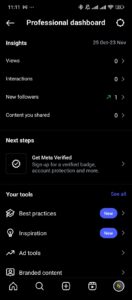
1. Use Instagram Insights (Professional Account Required)
A professional account is free. Insights show you data that helps you understand your page traffic.
How to Switch to a Professional Account
1. Go to Settings
2. Tap Account
3. Select Switch to Professional Account
Instagram Insights Show You:
- Profile visit count
- Age range of visitors
- Follower vs. non-follower reach
- City and country demographics
- Active times
- Reel reach and interactions
- Story performance
- Content engagement
You won’t see who visited, but you will understand how many people check your page and who they are in general terms.
2. Track Follower Changes
You can monitor patterns without using unsafe apps.
You might notice viewer interest if:
- Someone frequently likes old posts
- Someone views every story
- Someone reacts to reels often
- Someone follows you then unfollows repeatedly
These actions hint at profile visits, but they are not proof.
3. Use Story Stickers to Test Engagement
You can get clues about active viewers through interactive tools.
Use:
- Polls
- Question stickers
- Emoji sliders
- Quizzes
People who interact are likely checking your profile often.
4. Post at Consistent Times
Regular posting helps you see which content attracts more visits. This pattern tells you what brings attention to your profile.
Myths About Seeing Instagram Profile Viewers
A lot of misinformation circulates online. Here is a quick table to clear things up:
| Claim | True or False | Explanation |
|---|---|---|
| Instagram shows who views your profile | False | No such feature exists |
| Apps can show profile visitors | False | No API access; unsafe |
| Switching to a business account shows viewers | False | Only shows numbers, not names |
| Story viewers indicate profile visitors | Partly true | They saw your story, not necessarily your profile |
| Reels viewer identity is visible | False | You only see likes/comments |
Why Some People Think Instagram Lets You See Profile Viewers
The confusion comes from:
1. TikTok Features
TikTok shows profile viewers if you enable the feature. Instagram does not.
2. LinkedIn Features
LinkedIn shows profile visitors. Instagram is not designed for that.
3. Fake Tutorials
YouTube and blogs promote fake step-by-step guides to gain clicks.
4. Misleading Apps
App Store listings often use deceptive language to attract downloads.
Frequently Asked Questions (FAQ)
Can you see who views your Instagram profile using a professional account?
No. You only see numbers and demographics, not names.
Can someone see if you viewed their profile?
No. Instagram does not notify users of profile visits.
Can you see who viewed your Instagram highlights?
Yes. Highlight viewers are visible just like story viewers.
Does Instagram show who screenshots your posts or stories?
No. Users are not notified.
Do reels show who viewed them?
No. You only see likes and comments.
Are Instagram stalker apps safe?
No. They pose security risks and do not work as advertised.
If I watch someone’s story, will they know?
Yes. Story views show your username.
Can I see who viewed my Instagram profile through the website version?
No. Instagram Web has the same limits.
Conclusion
You cannot see who views your Instagram profile. Instagram does not offer a feature that reveals profile visitors, and apps claiming to do this are risky and inaccurate.
You can still learn about your audience using safe tools like Instagram Insights, story engagement, and interaction patterns. Always stick to official features, protect your privacy, and avoid untrusted apps.
 Share this post