If you want to change your username on X (formerly Twitter), the process takes under two minutes, and you won’t lose your followers, DMs, or tweet history. Your username (also called your handle) is the @name tied to your profile. It shows up in your profile URL, in mentions, and whenever someone tags you in a post. Changing your username is straightforward, but there are a few rules and other things you need to know before you tap that save button.
In this guide, you will learn how to change your X username on desktop and mobile, what the platform’s rules are, what happens after the switch, and how to handle common errors. Whether you are rebranding, cleaning up an old handle, or just want something that fits better, here is everything you need.
Username vs. Display Name: Know the Difference
Before changing anything, it helps to know what you are actually changing.
| Username (Handle) | Display Name | |
|---|---|---|
| What it is | Your @name — e.g., @johndoe | Your public name — e.g., John Doe |
| Unique? | Yes — no two accounts can share one | No — anyone can use the same display name |
| In your profile URL? | Yes — x.com/johndoe | No |
| Mentions & tags | Uses your handle | Not used for tagging |
| Special characters allowed? | No (letters, numbers, underscores only) | Yes, including emojis |
This article focuses on changing your username (handle). If you only want to update the name shown on your profile, that is a different field under Edit Profile.
X (Twitter) Username Rules
Before you pick a new handle or even make that decision to change, first go through these X username requirements:
- Length: Must fall between 4 and 15 characters
- Allowed characters: Letters (a–z), numbers (0–9), and underscores (_)
- No spaces, hyphens, periods, or other special characters
- Cannot be all numbers (e.g., @12345 is not allowed)
- Cannot start with a number or underscore
- Cannot include the words “Twitter” or “Admin”
- It must be unique since no two accounts can share the same handle.
- Capitalization does not create uniqueness, for example @JohnDoe and @johndoe are treated as the same.
Bonus Tip: Use the X (Twitter) Username checker tool on Social Username Checker to check the availability of multiple usernames before heading to X.
How to Change Your Username on X — Desktop
1. Open your browser and go to x.com. Log into your account.
2. Click the three-dot icon (More) in the left sidebar.
3. Select Settings and Support, then click Settings and Privacy.

4. Click Your Account.
5. Enter your password when prompted.
6. Click Account Information, then click Username.
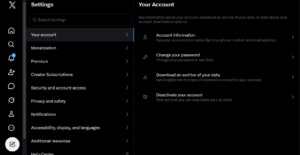
7. Clear the current username and type your new one.
8. If the username is available, a green checkmark appears. If it is taken, X will show an error and suggest alternatives.
9. Click Save.
After you complete the process your profile will update immediately. Your URL changes from x.com/oldname to x.com/newname right away.
How to Change Your Username on X — Mobile App (iOS & Android)
The steps are nearly the same to desktop, now on the mobile app.
1. Open the X app on your phone.
2. Tap your profile icon in the top-left corner.
3. Tap Settings and Privacy.
4. Tap Your Account, then enter your password.
5. Tap Account Information, then tap Username.

6. Delete the current username and type your new one.
7. Tap Done (iOS) or Save (Android).
Note: Some users report that the username change option isn’t accessible through the official mobile app on certain devices. If that is the case for you, open X in your phone’s browser (mobile.x.com) and follow the desktop steps above.
What Happens After You Change Your Username
A lot of people worry about what a handle change does to their account. Here is a clear breakdown:
What stays the same:
- Your followers and following list
- All your tweets, replies, and likes
- Your direct messages (DMs)
- Your verified badge (if you have one)
- Your lists, bookmarks, and account history
What changes:
- Your profile URL. Old links to your profile (e.g., x.com/oldname) stop working.
- Your @handle in all new interactions
- How people mention and tag you going forward
Important
The moment you change your username, your old handle becomes available for anyone else to claim. What this means? If you have a popular handle it might get taken within seconds. Once you change your handle, your old username becomes available and anyone can claim it , so if you ever want to reuse it, act quickly.
Also, old tweets and mentions that used your previous handle will not automatically update to show the new one; instead, they keep the old tag in the text, though they still link back to your account.
How Often Can You Change Your X Username?
X allows you to change your username as many times as you want, with no waiting period. This is more flexible than other social platforms like TikTok (30-day rule) or Twitch (60-day restriction).
That said, changing your handle more than 2–3 times within a few hours can trigger rate limiting that lasts 30 minutes to 3 hours. If you hit this, just wait it out before trying again.
Frequent changes also hurt brand recognition and can confuse your followers, so even though the platform allows unlimited changes, keep them intentional.
Common Errors and How to Fix Them
| Error | Likely Cause | Fix |
|---|---|---|
| “Username is already taken” | Another account holds that handle | Try adding underscores or numbers, or check back later if the account is inactive |
| “Username too long/short” | Exceeds 15 characters or under 4 | Shorten or lengthen your handle |
| “Invalid characters” | Spaces, hyphens, or symbols in the name | Use only letters, numbers, and underscores |
| “Rate limit exceeded” | Too many changes in a short period | Wait 30 minutes to a few hours |
| Can’t access username field | Account restrictions or verification issue | X added mandatory email verification for username changes in February 2026 — verify your email under Settings → Your Account → Email |
| Greyed-out save button | Username violates rules (e.g., all numbers, starts with underscore) | Review the username requirements and adjust |
Why People Change Their X Username
There is no single reason; here are the most common ones:
- Rebranding. Your old handle no longer fits your personal or business identity
- Professional shift. Moving from a casual account to a business presence
- Typo fix. Correcting a mistake made during original signup
- Name change. Legal name change or marriage
- Consistency. Matching your handle across all social platforms
- Availability. A better handle just became free
Tips for Picking a Good X Username
A strong username is short, memorable, and consistent with your brand elsewhere online.
- Keep it short. Shorter handles are easier to mention and leave more room in replies (X has a 280-character limit).
- Use the same handle across platforms. Consistency makes you easier to find on Google and across social media.
- Avoid underscores unless necessary. They make handles harder to type and say aloud.
- Skip numbers at the end (like @john123) — they look generic and forgettable.
- Check availability elsewhere. Use a tool like Social Username Checker to see if your new handle is free on Instagram, TikTok, and other platforms before committing.
Think long-term. Pick something you won’t need to change again in six months.
What to Do After Changing Your Username
Don’t just change it and move on. Take these steps to protect your presence:
- Post a tweet announcing the change so your followers know your new handle.
- Update your bio temporarily to reference your old handle (e.g., “formerly @oldname”).
- Update all external links on your website, email signature, LinkedIn, and any other places your old handle appeared.
- Check your X Premium profile if you are subscribed, make sure everything looks right.
- Monitor mentions for the next few days. Some followers may still tag your old handle by mistake.
Frequently Asked Questions (FAQs)
Will I lose my followers if I change my X username?
No. Changing your username will not affect your existing followers, direct messages, or replies. Your followers will simply see the new username next to your profile photo.
Can I get my old username back after changing it?
Only if no one else has claimed it. Once you switch, your old username becomes free for anyone else to claim immediately, so reverting isn’t guaranteed.
Do old tweets update to show my new username?
No. Old tweets and mentions keep the old @handle in the text. They still link back to your account, but the tag itself won’t change retroactively.
Can I change my username on the X mobile app?
Yes, in most cases. If the option appears greyed out or unavailable in the app, use X in your mobile browser (mobile.x.com) instead.
Does changing my username affect my verification badge?
No. If you have a verified badge (blue checkmark from X Premium or legacy verification), changing your username does not remove it. However, your handle must still comply with X’s guidelines.
Can I change my username to one that’s currently taken?
No. Every Twitter handle must be completely unique across the platform — no two accounts can share the same handle. If the handle you want is taken, try variations with underscores or numbers, or wait and check back.
What happens to my profile URL after the change?
When you change your X username, your profile URL updates immediately. Any links pointing to your previous username will no longer work.
Conclusion
Changing your username on X is a quick process with a few taps in settings, and you are done. Your followers stay, your tweets stay, and your DMs stay. What changes is your handle and your profile URL.
The two things to be careful about: your old username gets released the moment you save, and any external links pointing to your old handle will break. Sort those out before and after the change, and the switch will be seamless.
Pick something short, consistent, and built to last. Then go update it everywhere else so your audience can find you without confusion.
 Share this post