There are situations where you might want to appear offline on Roblox while playing. But you might be asking if there is an “appear offline” button that hides you completely from Roblox.
The truth? There is a built-in “invisible mode” on Roblox that hides your presence from everyone or the users you select. You can even take more steps to also hide your current experience, so others will not see you as online or get notifications when you play.
These changes affect what people see, like your status and whether they can message you or join your games.
In this guide, I will show you what you can do on PC, mobile, and consoles to appear offline on Roblox.
How to Appear Offline on Roblox PC
The best way to hide your online status is to change your visibility settings. This will hide your online status when playing games on the Roblox website and desktop app. Here is how:
1. Go to the Roblox website.
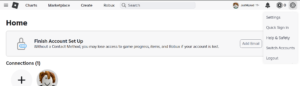
2. Go to Settings by clicking the gear icon at the top right.
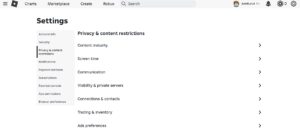
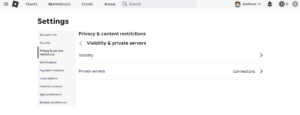
3. Go to Privacy (or “Privacy & content restrictions”), then click on Visibility & private servers.
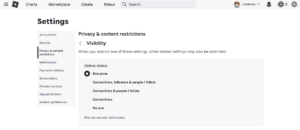
4. Under Visibility/Online Status, change the setting to “No one” (or an equivalent choice) so that no one sees your status.
5. Optional but helpful: Under “Show current experience,” change settings to “No one” so no one can see or join your current experience. Then also toggle off Share activity updates.
You can also change communication settings, like turning off or limiting who can message you, invite you, or join your games.
How to Appear Offline on Roblox Mobile
The steps are similar on the Roblox iOS & Android app. So even when playing on mobile, you can appear offline. Here is how:
1. Open the Roblox app.
2. Tap the three dots “More” menu in the bottom right corner of your screen. Then choose Settings.
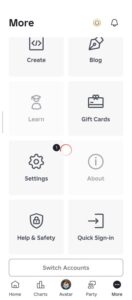
3. Go to Privacy (or “Privacy & content restrictions”) and then go to Visibility & private servers.
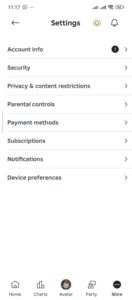
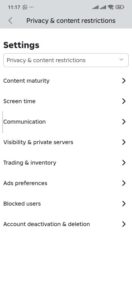
4. Under Visibility, change the Online Status setting to “No one” so that no one sees your status.
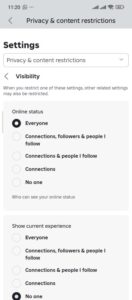
5. Optional: also change settings for show current experience and share activity updates.
You can also change communication settings by turning off or limiting who can message you, invite you, or join your games. This way no one can tell you are actually online.
Check out this guide to also enable or disable voice chat on Roblox.
How to Appear Offline on Roblox Xbox Consoles
It is easier to appear offline on Xbox with the built-in offline mode. This mode might hide your presence system-wide, which affects Roblox too.
Follow the steps below to appear offline on Roblox in Xbox console:
- Press the Xbox button on your controller to open the home page.
- Click on your avatar and then select your profile.
- From the dropdown menu, select the Appear Offline option.
No one on your list will be able to see you online in any game.
Appear Offline On PlayStation
To appear offline while playing Roblox on your PS4 or PS5 consoles, you have to use the built-in PlayStation settings to set your status as offline. Here is how:
- Go to the profile avatar on the home screen of your PlayStation console.
- Click the Online Status option and select Appear Offline.
If you follow these steps, your profile and friends list will not show you as online. This means friends will not get automatic game invites or chat/messaging from you.
What “appear offline” actually does and its limits
| Effect | What you get if you use the privacy settings |
|---|---|
| Other players (friends or followers) see you as online? | No, your status shows offline or is hidden. |
| Others receive game/join invites or see what game you play? | Usually no, privacy settings block that. |
| People can message or chat with you? | Not if you disable communication permissions. |
| You lose access to Roblox features (buying items, playing games)? | No, you still play and access everything. |
| Guaranteed full invisibility (even in game, to everyone)? | No, you become invisible only in status lists; other players in the same game can still see you. |
Important limitations
Roblox does not have a true “invisible mode.” There is no native setting that hides you completely from everyone at all times.
Even if you are hidden from friends, people in the same server/game as you will still see your avatar.
If you join a game via a direct invite or link, friends might still notice you are online (especially if they see the game’s active player list).
What about consoles (Xbox, PlayStation, etc.)?
On Xbox (Series X|S or Xbox One), you can use the console’s built-in offline mode. That might hide your presence system-wide, which affects Roblox too.
On PlayStation, some players claim you can set your PlayStation status to offline; that could help.
On other platforms (PC/mobile), there is no system-level offline feature, only the privacy settings inside Roblox.
If you mainly play on a console, using the console’s offline / invisible mode might help. But if you play on PC or phone, stick to the privacy settings described above.
When you might still show up online
You might still appear as online even if you think you set everything right. This can happen because:
- Some features/settings were not updated or saved properly.
- Roblox has bugs or delays in status updates. Some players report appearing online even after they logged out.
- You have joined a game server directly; being in the same server can still reveal you.
To avoid showing up
- Double-check your privacy settings, especially visibility, communication, experience sharing.
- Log out fully when you are done playing (don’t just close the window).
If you really want to play without being seen by friends, consider using a separate or alternate account.
Should you “appear offline”? Pros and cons
Why you might want it
- You don’t want random messages or game invites.
- You want to play privately or focus on a game.
- You want control over who sees you or interacts with you.
What you lose / what stays visible
- You lose easy social contact: friends can’t message or join you easily.
- You are not completely hidden, people in the same server still see you played.
- You might miss friends asking you to join or team up.
If you value privacy over social features, going “offline” with privacy settings makes sense.
If you are relaxed about social stuff, maybe default settings are fine.
Quick checklist before you hit “Play”
Before you start playing and want to appear offline:
- Privacy → Visibility → Online status = No one.
- Communication and join-invitations disabled / restricted.
- Activity sharing turned off (if available).
- Join only via a public server rather than a direct invite from friends (if you want privacy).
- If using a console, activate system-level offline mode (Xbox/PS).
FAQs
Is there a “true offline mode” on Roblox?
No. Roblox does not provide a native “invisible/offline mode” that completely hides you from everyone. What you can do is tweak privacy settings so most people won’t see your status or be able to contact you.
If friends see me as offline, can I still play with them if they send a direct invite?
Yes. Privacy settings mostly control visibility and who can message or join you, but if a friend shares a direct invite or link, you can still join.
Do I lose access to chat or buying items when I hide status?
No. You keep all game features, you just limit who can message or invite you.
Will hiding status work on all devices (PC, mobile, console)?
On PC and mobile: yes, via privacy settings. On console: requires using the console’s offline or invisible mode in addition to Roblox settings.
Conclusion
At this point you now know the steps to hide your online presence on Roblox. By changing privacy and visibility settings, you can make your status invisible to most people. That helps when you want privacy or just want to play without distractions.
 Share this post