Finding the right Instagram username is the first step if you are rebranding or feel the need to change your username. This article will guide you through how to check if an Instagram username is available using different methods.
You will learn:
- Official ways Instagram allows username checks
- The best tool that helps speed things up
- How to tell if a username is inactive or reserved
- What to do if your first choice is taken
- Common mistakes that waste time
This guide is all you need to check Instagram username availability for free and without login.
Why Instagram Username Availability Matters
Your username affects:
- How people find you
- Brand recall
- Trust
- Search visibility inside Instagram
Instagram usernames must be:
- Unique
- Under 30 characters
- Contain letters, numbers, periods, and underscores only
Once someone takes a username, no one else can use it unless it gets released by Instagram.
Instagram Username Rules You Should Know First
Before checking availability, understand the limits. Instagram blocks names that break platform rules.
Instagram username requirements
Length
1–30 characters
Allowed characters
- a–z
- 0–9
- periods (.)
- underscores (_)
- No spaces
- No symbols like @, #, $, %
- No offensive or restricted terms
- Instagram also blocks names that
- Impersonate public figures
- Copy verified brands
- Violate trademark policy
If a username looks available but fails during signup, one of these rules is usually the reason.
How to Check If an Instagram Username Is Available
Method 1: Use Instagram Username Checker Tools
This is the best way to check multiple Instagram usernames for free without being logged in. You will use our Instagram handle checker to get accurate results at no cost.
How to use our Instagram account Availability Checker tool.
1. Visit the Instagram Username Checker page.
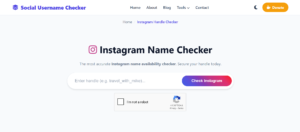
2. Type your desired user name in the name field.
3. Verify reCAPTCHA and click Check.
If the name is available, you will see the status as “Available.” If the name is taken, you will see some information about the account.
What is special about this tool? You can save any name you check by clicking on the heart icon. This is useful when you want to check multiple names across other social media platforms on social username checker.
2. Check Availability Using the Instagram App
If you would like to use the Instagram app to check name availability, this method is for you.
Steps on mobile (Android or iOS)
1. Open the Instagram app
2. Tap Sign up (log out if already logged in)
3. Choose Username when prompted
4. Type the name you want
5. Instagram checks availability instantly
You’ll see:
A green checkmark if available
An error message if taken or invalid
This is a good method if you don’t mind going through signup steps, which can be slower if you are checking many names.
Method 3: Check Availability via Instagram Web
You can also check usernames using a browser.
Steps
1. Go to instagram.com
2. Click Sign up
3. Enter a username in the username field
4. Instagram shows availability feedback
This method works well on desktop and helps if you want to copy and test multiple options quickly.
Method 4: Try Logging In With the Username
This method works if you suspect the name exists.
Steps
1. Go to Instagram login
2. Enter the username
3. Use a random password
4. Submit
If Instagram says:
User not found → likely available
Incorrect password → username exists
This method gives fast clues but not final confirmation.
Method 5: Search the Username Directly on Instagram
Sometimes the simplest option works.
Steps
- Open Instagram
- Tap search
- Type the exact username
- Look for profiles
If no profile appears:
The name might be available
Or the account might be hidden, banned, or inactive
This method works best when combined with others.
Method 6: Check Availability Through Facebook Business Manager
Instagram connects to Meta. Business accounts can check usernames while creating assets.
Steps
1. Open Meta Business Manager
2. Create or edit an Instagram business account
3. Enter desired username
4. System checks availability
This method works best for brands managing multiple accounts.
How to Check If an Instagram Username Is Reserved
Some usernames look unused but still block access.
Reasons Instagram reserves usernames
- Past policy violations
- Trademark conflicts
- High-profile names
- Inactive accounts under review
Signs a username is reserved:
- No profile appears
- Signup rejects it
- Tools show mixed results
There is no public list of reserved names so it can be hard to see if your desired name is reserved.
How to Check If an Instagram Username Is Inactive
Inactive accounts confuse many users.
Signs of inactive accounts
- No posts
- No profile photo
- No bio
- Old creation date
Even inactive usernames stay locked unless Instagram removes them. Instagram rarely frees names unless:
- The account violates policy
- The account gets banned
- The owner deletes it
Instagram does not release names on request.
Can You Claim an Instagram Username That’s Taken?
In most cases, no. There is no way to claim a username that is taken by another Instagram user.
Exceptions
- Trademark ownership
- Brand impersonation
- Copyright violation
Trademark claim process
- Own a registered trademark
- Report impersonation via Instagram
- Submit legal documentation
Instagram may transfer or remove the username after review.
This process takes time and offers no guarantee.
Smart Workarounds When Your Username Is Taken
If your desired username is taken, you still have options to claim similar name.
Add small modifiers
Use underscores: `yourname_`
Use periods: `your.name`
Add keywords
- `official`
- `studio`
- `media`
- `shop`
Use location tags
- `yourname_nyc`
- `yourname_uk`
Shorten words
Remove vowels
Use initials
Examples
| Taken Name | Alternative |
|---|---|
| alexdesign | alex.design |
| fitlife | fitlife.co |
| brandname | brandnamehq |
Keep it readable. Avoid long strings.
Common Mistakes When Checking Instagram Username Availability
Many people waste time due to avoidable errors.
Mistakes to avoid
- Ignoring Instagram rules
- Using banned words unknowingly
- Adding extra symbols
- Copying large brand names
Always confirm inside Instagram before finalizing.
SEO and Branding Tips for Instagram Usernames
If your account supports content or business goals, think long term.
Best practices
- Keep it short
- Make it easy to spell
- Avoid numbers unless needed
- Match other social handles
- Avoid trends that age fast
Search inside Instagram favors:
- Clear names
- Consistent branding
- User recognition
Frequently Asked Questions (FAQs)
How to check if an Instagram username is available without signing up?
Use the Social Username Checker tool to check Instagram username availability without owning an Instagram account.
Can I check Instagram username availability in bulk?
Yes. Tools like SocialUsernameChecker allow multiple checks.
Are deleted Instagram usernames reusable?
Sometimes. Instagram decides case by case.
Why does Instagram say a username is unavailable even if no profile exists?
The name may be reserved, inactive, banned, or blocked by policy.
Can I buy an Instagram username?
Buying or selling usernames violates Instagram rules and risks account loss.
Conclusion
If you followed the guide to this point, congratulations, you now know the different methods to check if an Instagram username is available. You can use multiple methods to make sure the name is really available.
 Share this post