Changing your Roblox username is a great way to upgrade to a better name that suits your current vibes. There are many reasons to want to change your username, but even if you change to a new name, you can still switch back to your old name.
This guide covers everything you need to know about how to change your Roblox username on both desktop and mobile, the costs involved, and the difference between your username and your display name.
Username vs Display Name
Before you spend any money, you need to understand the two types of names on Roblox. This difference can save you 1,000 Robux.
Display Name (Free)
Your display name is what people actually see in-game. It appears above your avatar’s head and in the chat.
Cost:
0 Robux (Free).
Frequency:
You can change it once every 7 days.
Uniqueness:
Not unique. You can have the same display name as thousands of other players.
This name can be changed when you want a fresh look for a week or want to match with friends.
Username (Paid)
Your username is your unique account identifier. It appears on your profile URL and is used to log in.
It is permanent unless you pay to change it. Each user has a unique username that other Roblox players use to find them and view their profile.
Cost:
1,000 Robux (approx. $12.50 USD).
Frequency:
As often as you can afford.
Uniqueness:
Must be 100% unique. No two players can have the same username.
This is the option to go with if you hate your login name or want a completely new identity on the platform.
If you just want to change what people call you in a game, change your display name. If you want to change your login credential and profile link, change your username.
How to Change Roblox Username on Desktop (PC/Mac)
If you are on a computer, the process is done through the website. You cannot do this through the Windows app player, you must use a browser.
1. Log In: Go to the Roblox website and sign in.
2. Go to Settings: Look for the gear icon in the top-right corner of the screen. Click it and select Settings from the dropdown menu.
3. You will land on the “Account Info” tab automatically. Look for the “Account Info” section at the top.
4. Edit Username: Locate your current username. To the right of it, there is a small icon that looks like a pencil and paper. Click this icon.
5. Enter New Name: A pop-up window will appear. Type your desired new username in the box.
6. Enter your current Roblox account password to verify it is really you.
7. Click the Buy button. This will deduct 1,000 Robux from your balance.
If successful, the page will refresh, and your new name will be active immediately.
How to Change Roblox Username on Mobile (iOS/Android)
The process on mobile is similar but you will use the Roblox app.
1. Launch the Roblox app on your phone or tablet.
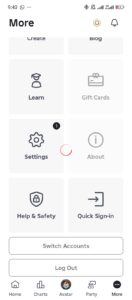
2. Tap the circle with three dots (…) located in the bottom-right corner navigation bar.
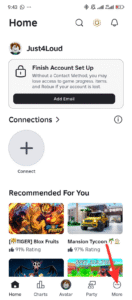
3. Scroll down until you see the Settings gear icon and tap it.
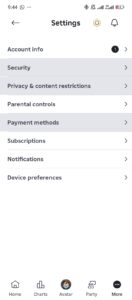
4. Tap the first option, Account Info.
5. Find your username under the “Account Info” header. Tap the pencil and paper icon next to it.
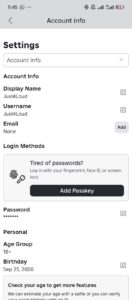
6. Type your new requested username and your account password.
7. Tap Buy to finalize the 1,000 Robux transaction.
Your new username will now appear on your profile.
Even if you have the money to change your username, you cannot just pick any name. Roblox has some requirements and rules to follow when choosing a name.
1. Character Limit: Your name must be between 3 and 20 characters long.
2. Allowed Characters: You can only use letters (a-z), numbers (0-9), and underscores (_).
3. Underscore Rules: You can only use one underscore, and it cannot start or end the username. It must be somewhere in the middle.
4 Restricted Text: The filter blocks profanity, personally identifiable information (like real names or phone numbers), and anything that violates community standards.
5. Availability: If a banned account used the name previously, it is often permanently locked and unavailable, even if the account is gone.
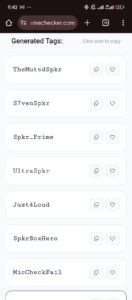
The username on the account screenshots used above was generated with our free Gamertag Generator tool. You can generate your next Roblox username using this tool.
What Happens After You Change It?
Changing your username is a big account event. Here is what stays and what shifts.
What Changes:
Login:
You must use the new username to log in. Your old name will no longer work for sign-ins.
Profile URL:
Your profile link will update to reflect the new name.
Search:
People searching for your old name will generally be redirected to your new profile, but eventually, the old name search index may fade.
What Stays the Same:
Friends: You do not lose any friends. Your name simply updates on their friends list.
Join Date: Your “Join Date” on your profile remains the original date you created the account.
Inventory & Robux: All items, game passes, and remaining Robux are safe.
Your save data in games (like levels in Blox Fruits or pets in Adopt Me) is linked to your User ID (a string of numbers), not your username. It will not be lost.
Troubleshooting Common Issues
Sometimes the “Buy” button is greyed out, or you get an error.
“Username Already Taken”
This is the most common error. With millions of users, most simple words are gone.
Fix:
Add numbers or an underscore. Instead of “Ninja,” try “Ninja_99” or “Real_NinjaX”. You can also use our Gamertag generator to get your next username in seconds.
“Appropriate Text” Error
The filter is aggressive. It might flag a word that seems innocent if it contains a sequence of letters that resembles a banned word.
Fix:
Try changing the spelling slightly. If “Kill” is blocked, try “Strike”.
“Insufficient Funds”
You do not have 1,000 Robux.
Fix:
You must purchase Robux before attempting the change. You cannot pay with a credit card directly during the name change pop-up, you must load the currency first.
Frequently Asked Questions (FAQs)
What is Foltyn Roblox username?
Foltyn is a popular Roblox YouTuber known for his trolling and skit videos. His actual Roblox username is TheRealFoltyn. Be careful when searching for him, since there are many fan accounts and impersonators using similar names.
What is Caylus Roblox username?
Caylus (also known as Infinite or Infinite Lists) has a few associated accounts, but his main Roblox username is ViewYT.
What is a good Roblox username?
A good username is memorable and unique without being a random string of numbers.
Can I change my username back to an old one?
Yes, but it is not free. Roblox saves your past usernames in your account history, so nobody else can take them. You can change your username back to the previous name, but you still have to pay the 1,000 Robux fee.
Is there a way to change my username for free?
No. Changing the actual Roblox username always costs 1,000 Robux. There are no cheat codes, hacks, or glitches to bypass this.
The Exception:
If you just created an account and realized you made a typo or used your real name by accident, you can try contacting Roblox Support immediately.
The Alternative:
Use the Display Name feature. As I mentioned earlier, this is 100% free and changes how you appear to everyone in the game.
For 99% of players, changing the Display Name is enough to feel like they have a new identity without spending money.
How do I hide my previous usernames?
If you have changed your name multiple times, your profile will show a list of “Previous Usernames” by default.
If you want a fresh start and don’t want people to see your old identity:
- Go to Settings.
- Go to Account Info.
- Scroll down to the Profile section.
- Toggle the Previous Usernames setting to Off.
This will hide your name history from other players, though Roblox admins can still see it.
What should I change my Roblox username to?
Change your Roblox username to something that is unique and easy for other players to remember. If you come up with a name, use our free Roblox username availability checker to confirm it is available.
Conclusion
At this point, you know how to change your Roblox username and display name. The 1,000 Robux fee might be a bit steep for a username change, but it ensures that usernames remain stable in the community.
 Share this post