Roblox usernames help other players find you, build your identity, and create trust inside the platform. Before you pick a name, you want to confirm that no one else has already claimed it.
There are different methods to check if a Roblox username is available. I will be sharing 5 of the best methods to check availability without wasting time. The first method is the fastest and most preferred way to check even without login.
How Roblox Username Availability Works
Roblox updates names in real time. When a user claims a name, the system blocks it instantly. Roblox does not release deleted or banned account names, so some names stay unavailable forever.
Roblox usernames must follow specific rules:
- Basic Username Rules
- Must be 3–20 characters
- Letters, numbers, and underscores only
- No spaces
- No special characters
- Must follow Roblox’s safety filters
- No inappropriate or misleading terms
- Cannot impersonate brands, public figures, or official accounts
If your name breaks any rule, the system rejects it before checking availability.
Method 1: Try Username Availability Checker Tools Online
The best way to check if your desired Roblox username is available is using an online tool. These tools save time when you want multiple name ideas quickly.
Follow these steps to check the availability of a Roblox username:
1. Go to Social Username Checker’s Roblox Name Tool.
2. Type in a Roblox username in the text field and verify reCAPTCHA.
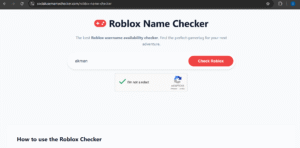
3. Tap on Check Roblox.
4. You will see if the name is available or taken.
This tool is free and does not require a sign-in to check usernames. The best part is that you can also use the free GamerTag Generator to get a cool name and then verify availability.
Best way to use this tool.
Generate your gamer tags and save them.
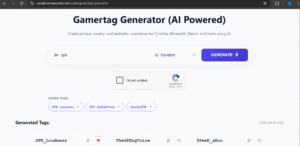
Now head over to the Roblox Username Checker page, and your saved names should be visible there.
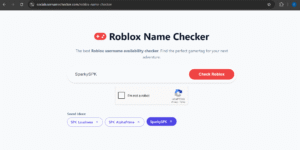
Tap each name and submit to check availability. Do this for other names you have saved.
Why the SocialUsernameChecker Tool Is #1
- Free tool.
- No login required.
- Real-time database username check.
- Can generate GamerTags for free.
Method 2: Check Username Availability During Sign-Up
Another method for how to check if a Roblox username is available is using the sign-up form.
Steps
1. Go to Roblox.com.
2. Open the registration form.
3. Type your desired username into the username field.
4. Wait for the automated message to appear.
5. Roblox will show:
Username is already in use
Username is appropriate
Username is too short / too long
Username contains invalid characters
6. Try variations until you find a valid name.
Pros
Quick
Works on mobile and desktop
Cons
Requires filling out parts of the sign-up form, like date of birth.
Method 3: Use the Roblox Profile URL Trick
You can also test usernames through the profile URL format. Roblox usernames are linked to profile URLs.
How it works
1. Open your browser.
2. Enter the URL:
https://www.roblox.com/users/profile?username=YourDesiredName
3. Replace YourDesiredName with the name you want.
4. Press enter.
Results You May See
| Result | Meaning |
|---|---|
| “User not found” page | The username may be available |
| A real profile appears | Username is taken |
| Redirect to a random profile | The name is unavailable or invalid |
Notes
This method is not 100% accurate.
Use this only for quick filtering, then confirm inside Roblox or using the tool mentioned in method 1.
Method 4: Use the Roblox Search Bar
You can search usernames directly inside your account.
Steps
- Sign in to Roblox.
- Tap the search bar.
- Enter the name you want.
- Choose “People” from the filter list.
- Review the results.
How to Read the Results
- If profiles with that name appear → name is taken
- If no profiles appear → name may be available
Again, check availability during the name change or sign-up step to confirm.
Method 5: Check Availability When Changing Your Username
If you are already logged into your Roblox account, you can check availability inside the username change section.
Steps
- Log in (if logged in move to next step).
- Open Settings.
- Select Account Info.
- Tap Change Username.
- Type your new name.
- Roblox shows its availability status instantly.
Important
Roblox charges 1,000 Robux for a username change. Checking the name is free.
Roblox Username Ideas That Pass the Availability Check
If you are stuck, you can use patterns that often give you available usernames.
Simple Patterns
Add short numbers
Example: `ShadowLine21`
Add an underscore
Example: `Jet_Walker`
Add short prefixes
`Its`, `Real`, `The`, `Only`
Add short suffixes
`HQ`, `YT`, `Dev`, `Plays`
Quick Availability-Friendly Patterns
| Pattern Type | Examples |
|---|---|
| Prefix | ItsKai, TheRin, RealArlo |
| Suffix | MiloPlays, TheoDev, KiraHQ |
| Combo | ItsRexYT, RealNovaPlays |
| Number Add-on | Lira45, Meco17, Fari80 |
Combining these formats increase your chances of finding an available name.
Common Reasons Your Roblox Username Is Not Available
Sometimes a name looks available, but Roblox still blocks it. Here is why.
Possible Causes
- Another user claimed it first.
- The name triggers the chat filter.
- The name includes restricted phrases.
- The name is too short or too long.
- The platform blocks it for safety reasons.
- The name resembles a known developer or brand.
- The name includes private data like email terms or location details.
If Roblox rejects your name repeatedly, use a GamerTag generator tool like the one mentioned above to get the right name fast.
Frequently Asked Questions (FAQs)
Why does Roblox say a username is not appropriate?
The system blocks names that include restricted words, sensitive topics, or anything that may be interpreted as unsafe for young users.
Can I use spaces in a Roblox username?
No. Roblox does not allow spaces. Use underscores instead.
Can I use special characters?
No. Only letters, numbers, and underscores work.
Can I take a banned player’s username?
No. Roblox keeps these names unavailable forever.
What happens if I change my username?
Your old username becomes locked, and no one else can claim it.
Can someone steal my username?
No. Once you claim a username, it stays linked to your account permanently.
How often can I change my Roblox username?
You can change it anytime, as long as you pay the 1,000 Robux fee.
Conclusion
Now you know several methods for how to check if a Roblox username is available. The easiest way is to use a free tool that lets you check multiple options and save your checks so you can make your decision once you are done searching.
Whichever of the five methods you choose to use, they pretty much solve the username check issue.
 Share this post