
Instagram gives you many creative options, but sometimes the sound you want already exists on TikTok. You can bring that same audio into your Reels.
This guide shows you how to import TikTok audio into Instagram Reels using simple steps that will not get your content flagged.
This method allows you to keep up with trends across Instagram and TikTok and reuse sounds that are already popular.
TikTok and Instagram do not link together, so you need a workaround. I will provide the exact steps you need to follow, tools you can use, the quality rules, and the copyright risks you should be aware of.
I will try as much as possible to keep this guide simple and short while providing the information you need.
Can You Import TikTok Audio Into Instagram Reels?
This is not a simple yes or no answer. You cannot transfer audio directly between the apps. Instagram does not allow downloading TikTok sounds. TikTok also does not offer an official export tool.
But you can still add TikTok audio to your Reels by saving the entire video and then extracting or using the sound inside Instagram.
You have three main options:
- Save your TikTok video and import audio to Reels.
- Extract only the audio using a third-party tool.
- Record the audio manually.
The best option depends on how clean you want the audio to sound and how you plan to edit your reel.
Method 1: Import TikTok Audio Directly From a Saved TikTok Video
This first method is the fastest and easiest if you want the original sound without having to extract separately.
Steps to follow
1. Open the TikTok video with the sound you want.
2. Tap Share.
3. Tap Save video or Download.
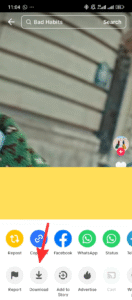
4. Open Instagram and go to Reels.
5. Tap Create.
6. Tap on Audio or the Audio icon.
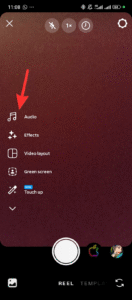
7. On the audio screen tap on Import.
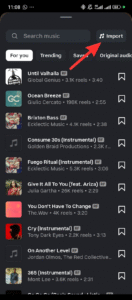
8. Upload the TikTok video and wait for the audio to import.
7. Select which part of the audio you want to use and Tap Done.

8. Start creating your video and the audio will be added.
Pros
Fast and simple.
No additional tools.
Keeps the sound synced with the clip.
Cons
None
Method 2: Extract Only the TikTok Audio
This is a little bit similar to the first step, but you will use a third party tool to extract the audio online and then create a video.
Steps
1. Save the TikTok video.
2. Use an audio extractor tool (search “video to MP3 converter”).
3. Download the extracted audio to your phone.
4. Open a video editor like Capcut.
5. Start editing your video and import extracted audio from step 2 into your video.
6. Once you are done editing, export your video.
7. Open Instagram → Reels → Add or Create.
5. Upload your edited video to Instagram and post.
Pros
Gives you more control during editing.
Cons
Takes more time.
You depend on an external tool.
Quick Comparison Table: Best Use Cases
| Method | Best For | Quality | Watermark | Tools Needed |
|---|---|---|---|---|
| Save TikTok video | Fast Posting | High | No | None |
| Extract audio | More Editing Control | High | No(Depends on Editor) | Yes |
| Manual Recording | Quick sound capture | Low | No | Yes |
Method 3: Record TikTok Audio Manually
This method works when the TikTok video doesn’t allow downloads.
Steps
1. Turn your phone volume up.
2. Play the TikTok clip.
3. Use a second phone or screen recorder to record the audio.
4. Import that recording into Instagram Reels.
Pros
Works even on protected videos.
Cons
Audio may sound noisy.
Not ideal for music-heavy content.
How to Avoid Copyright Problems When Importing TikTok Audio
Instagram is stricter with copyrighted audio than TikTok. Before you import any sound, consider the following:
1. Check if the audio is licensed
If it is a commercial song, Instagram may mute your Reel.
2. Use original sounds from small creators
Original audio from TikTok creators usually performs better on Instagram.
3. Use short clips.
Short clips reduce copyright detection.
4. Add your voice or remix the audio.
A few small changes help make the sound more “transformative.”
5. Keep the audio volume low.
Lower volume reduces detection, but your message must still be clear.
How to Make Your Imported TikTok Audio Perform Better on Instagram Reels
Bring the sound over, but also think about performance. Instagram pushes content that keeps viewers watching.
Do this for better reach:
- Keep your Reel under 12 seconds.
- Use on-screen text so the viewer knows the context.
- Add a clear hook in the first 1–2 seconds.
- Place the audio volume between 15% and 25% under your voice or main sound.
- Choose a thumbnail that fits your page style.
Hashtag suggestions
You can use a mix like
- #instagramreels
- #reelsaudio
- #tiktokaudio
- #reelstips
- #socialmediatips
- #howto
Use no more than 5–8. Instagram prefers a smaller number.
FAQs
Can Instagram detect that my audio came from TikTok?
Instagram cannot detect the origin of the audio file, unless the video uses a licensed track.
Is it allowed to use TikTok audio on Instagram Reels?
Yes, but copyrighted music may get muted. Original sounds usually work fine.
Can I import TikTok audio without downloading the full video?
No. You must save the clip or record the audio.
Conclusion
You now know three ways to import TikTok audio into your Instagram Reels. The fastest method is saving the TikTok video and uploading it to Instagram. The cleanest method is extracting only the audio. Recording the audio works as a backup when downloads are not allowed.
Pick the method you prefer, keep your audio clip short, watch out for copyright issues, and use editing tools inside Instagram to sync everything together.
 Share this post