Your YouTube channel name is kind of like your identity and should make you stand out. If you want your brand to be clear and easy to find, you need to know how to check if YouTube channel name is taken before you start creating.
This is the first step to take when starting a channel or rebranding to avoid issues with name conflicts, unavailable handles, or confused viewers.
This guide shows you different methods to check name availability across YouTube and related platforms. You will see the steps, the best tools to use, and the best practices to follow.
What YouTube Uses: Channel Names vs Handles
Before you check name availability, you need to know how YouTube uses names.
1. Channel Name
This is what viewers see on your homepage and under your videos. Your channel name is what people see on YouTube.
Two different channels can use the same channel name. But I do not recommend this if you want to grow.
2. YouTube Handle (@handle)
This is your unique username. This is the name on your YouTube channel URL.
No two channels can have the same HANDLE since each profile is unique.
You need to check both.
How to Check If a YouTube Channel Name Is Taken
Below are the fastest and most reliable ways.
1. Use Social Name Availability Tool (Cross-Platform Check)
The best way to check if a YouTube name is available is to use an online name availability tool like Social Username Checker. With this tool, you get to see if the handle name of your choice is available or taken.
Why is this the best option? No login is required, and you can store names as you check to help you compare later.
Steps to follow
1. Visit YouTube name checker tools on Socialusernamechecker.
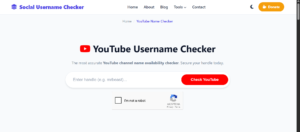
2. Type in the name you want to check.
3. Verify reCAPTCHA and click the Check button.
If the name is taken, Socialusernamechecker will show you when the account was created and other information about that account.
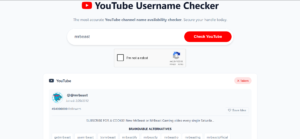
So if your chosen name is already used, you will see when the account was created. But if the name is available, you can click the heart icon to store it while you continue checking other names.
Once you find your desired name, you can then create your account on YouTube or update your profile.
The best time to use this tool is when you also want the same username across TikTok, Instagram, and X. This tool allows you to check the name across other social media platforms.
2. Search the Name Directly on YouTube
If you are already logged in to YouTube, you can use the search bar to check if a name is taken or not.
Steps
1. Go to YouTube.
2. Type your channel name idea in the search bar.
3. Hit enter.
4. Look through the first two pages.
What to look for
- Channels with the exact name
- Channels with close spelling
- Channels using numbers or symbols to copy the name
- Channels in your niche using that name
- Channels with the same handle format
Why this check matters
If someone is already using the name or a close version, your channel may get lost in search results.
3. Check YouTube Handle Availability Manually
Handles are unique, so this is the most important check. But this method can be slow if you want to check multiple names.
Steps
1. Visit any YouTube channel: `youtube.com/@`
2. Type your name idea after the @
3. If a channel loads, the handle is taken.
4. If you see an error page, the handle is free.
Example
Try:
`youtube.com/@yournameidea`
Handle Rules
Min 3 characters
Max 30 characters
Letters, numbers, underscores, hyphens, and periods are allowed.
Must be unique
The first method is the best alternative to check multiple handles without having to edit the YouTube channel URL.
3. Use YouTube Studio to Check Availability
YouTube Studio lets you check before you launch your channel.
Steps
- Log in to your Google account.
- Go to YouTube Studio.
- Open Customization
- Go to the Basic Info tab.
- Enter your handle.
- YouTube will show if it is available.
What to watch
YouTube may auto-suggest alternatives if your first idea is taken.
Other Things to Check
Depending on what you need the name for, there are also other things you need to check even if your desired name is available on YouTube.
1. Check Domain Availability
Using the same name for your site helps with branding.
Where to check
- Namecheap
- GoDaddy
- Google Domains
Tip
If the .com is taken, you can still consider .net or .co. But try to get the .com for long-term branding.
2. Google Search the Name
This checks how competitive the name is outside YouTube.
Steps
1. Open Google
2. Search your channel name
3. Review the first three pages
What you want to avoid
Heavy trademark presence
Big brands using the same name
Similar creators dominating the niche
High search volume for unrelated topics
This helps you avoid picking a name that is hard to rank for.
3. Check for Trademarks
This protects you from future legal issues.
Where to check
USPTO (United States)
WIPO Global Brand Database
EUIPO (Europe)
Your local trademark office
You should avoid names that:
Match a registered trademark.
Are too close to one
Sound like a well-known company.
A clean legal check protects your channel from takedowns or claims later.
Tips for Picking a YouTube Channel Name That Works
Use these points to craft a strong name once you find an available one.
1. Keep it short
Names under 18 characters are easier to search and remember.
2. Use simple spelling
Avoid confusing letters or complicated words.
3. Avoid numbers unless they matter
Numbers make your name look generic unless they’re intentional.
4. Make it easy to say out loud
This helps when people talk about your channel.
5. Avoid punctuation
Except for hyphens or underscores if needed.
6. Match the handle and channel name
It helps viewers find you faster.
7. Think long-term
Pick something that fits your content even if the style changes.
Common Problems You Might Face
Here is what many creators run into.
Problem 1: The channel name seems free, but the handle is taken
This is common because handles are unique.
Fix
Try a minor variation:
Add “tv”
Add “hq”
Add a short word related to your niche
Problem 2: A small inactive channel uses your preferred name
Even if the channel is inactive, you can’t claim the handle.
Fix
Pick a variation.
Or adjust the spelling slightly.
Problem 3: You keep getting “This handle is not allowed.”
YouTube blocks some words.
Fix
Remove:
Brand names
Offensive words
Terms flagged for safety reasons
Problem 4: Someone in another country uses the same name
This can still affect your visibility.
Fix
Modify the name or add a niche keyword.
Examples of Good and Bad YouTube Channel Names
Good
| Name Type | Example | Why Good |
|---|---|---|
| Short & clear | TechSignal | Simple and easy to search |
| Niche-based | FitDaily | Instantly communicates topic |
| Personal | ChrisEdits | Easy to brand |
Bad
| Name Type | Example | Why Bad |
|---|---|---|
| Random numbers | CoolGuy48291 | Hard to remember |
| Long name | DigitalMarketingTipsChannel | Too long for search |
| Hard spelling | Ph0t0gr4phyHax | Confusing |
SEO Tips When Choosing a Name
A name alone won’t rank your channel, but it helps.
Use niche keywords
Example:
If you teach editing, using “edit” or “cuts” helps context.
Check search volume
Plug keywords into:
- Google Trends
- Keyword Planner
- YouTube search suggestions
Stay original
Copying a big creator hurts your SEO.
- Keep it reader-friendly.
- People click names they understand right away.
FAQs
Can two YouTube channels have the same name?
Yes. Channel names are not unique. Handles are.
Can you change your YouTube channel name later?
Yes. You can change it anytime in YouTube Studio.
Do name changes affect ranking?
In small cases, yes.
If your new name matches your niche better, you may gain search visibility.
Should your YouTube channel name match your social media names?
It helps with branding, but it’s not required.
How long can a YouTube handle be?
Between 3 and 30 characters.
What happens if someone copies my channel name?
You can report only if they impersonate you.
You can’t report based on name alone.
Is it possible to buy a handle?
YouTube does not allow buying or selling handles.
Can a channel lose its handle?
Yes. If the channel violates YouTube rules or stays inactive for long periods.
Conclusion
Checking if your YouTube channel name is taken is easy when you follow the right steps. This guide provides the best methods to check that your channel name is available.
You only need to check YouTube search, handle availability, Google results, trademarks, and cross-platform usernames. All this was discussed in this guide.
 Share this post