There are times when you would want to quickly check if an X (Twitter) username is available. Especially if you are starting a new account, rebranding, or planning ahead for a project.
X (formerly Twitter) still works on a first-come basis for usernames, and many short or clean handles are already taken. That does not mean you are out of options. You just need to check availability the right way and avoid mistakes that waste time.
When you check an X Twitter username, you are not only checking if someone else uses it. You are also checking if X has restricted it, suspended it, or reserved it.
In this guide, you will learn how to check if an X (Twitter) username is available using official and third-party methods. You will also learn what to do if the username you want is already taken.
What Is an X (Twitter) Username?
An X username, also called a handle, is your unique ID on the platform. This is similar to the usernames on other social media platforms.
- It starts with @
- It can contain letters, numbers, and underscores
- It must be between 4 and 15 characters
- It cannot include spaces or symbols
Examples:
- @yourbrand
- @alex_tech
- @newsdaily
Your username appears:
- In your profile URL
- In replies and mentions
- In search results
- On external links to your account
Once taken, no one else can use the same username at the same time.
Why Username Availability Matters
Your username is the first thing users see, and it is also how users find you on X, so you need a good username that matches your brand.
A good username helps with:
- Brand recall
- Search visibility on X
- Consistent naming across platforms
- Trust with new followers
If you plan to use X for business, content, or support, picking an available and usable username early saves problems later.
How to Check If X Twitter Username Is Available
Method 1: Use Social Username Checker Tool
The Social username checker tool is a free username checker tool that allows you to check social media usernames for free without being logged in.
How to Use
1. Go to the X Twitter Username Checker page.
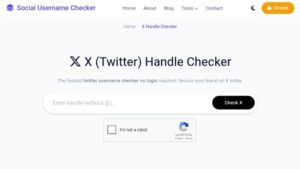
2. Enter a username in the field.
2. Verify reCAPTCHA and click Check.
3. Review results
If the username is available, you will see an available status. If the username is taken, you will see a status and additional information, like when the account was created, to know the age.
Method 2: Check Directly on X
For this step you will have to be logged out or use another browser where you are not logged in.
On Desktop
- Go to x.com
- Click Sign up or Create account
- Enter your name and email
- When prompted to choose a username, type the handle you want
- X will show:
- Available
- Unavailable
- Suggested alternatives
If X accepts it without an error, the username is available.
On Mobile App
- Open the X app
- Tap Create account
- Enter basic details
- Enter your desired username
- Watch for availability feedback
Tip: You do not need to finish account creation to test usernames.
Method 3: Check Username via Profile URL
This method is quick but not always accurate.
Steps
1. Type this into your browser:
2. Replace username with the handle you want
What You will See
- Active profile means username is taken
- Error page or “This account doesn’t exist” might be free
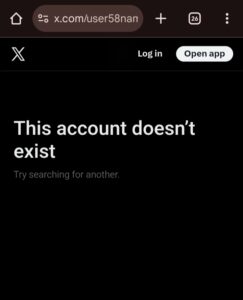
Warning: Some usernames show no profile but still cannot be claimed. X may have locked them.
Method 4: Use the Username Change Page (Logged-In Users)
If you already have an X account, you can use the username change settings to check handle availability.
Here is how:
- Log in to X
- Go to Settings
- Open Your account
- Click Account information
- Select Username
- Enter the new username
If X allows you to save it, the username is available.
Why Some Usernames Look Available but Are Not
This frustrates many users.
Common Reasons
- Account was suspended
- Username was locked by X
- Username violates policy
- Username was recently released
- Username is reserved
X does not publish a public list of restricted usernames.
X Username Rules You Must Follow
Before you test usernames, check these rules:
- 4–15 characters only
- Letters, numbers, and underscores only
- No impersonation
- No misleading brand names
- No offensive terms
Violating rules can lead to forced username changes later.
Check Username Availability Across Social Platforms
Consistency helps branding.
Before locking in a username:
- Check Instagram
- Check TikTok
- Check YouTube
- Check domain names
Use our username checker tool to check availability for these social media platforms here.
Can You Claim an Inactive X Username?
Short answer is usually no. X rarely releases usernames from inactive accounts.
Exceptions:
- Trademark disputes
- Legal action
- Direct negotiation with owner
For most users, it is better to choose an alternative.
Common Mistakes When Checking X Username Availability
Avoid these errors:
- Relying only on most third-party tools
- Assuming “no profile” means free
- Ignoring X username rules
- Picking usernames too close to popular brands
- Not securing backups
Best Practices Before Finalizing Your Username
- Test on X directly
- Save 3–5 backup options
- Check spelling twice
- Say it out loud
- Picture it in a profile URL
A username change later can confuse followers.
FAQs
Can I check X username availability without an account?
Yes. Use the social username checker tool in method 1 to check account availability without an account.
Can two people have the same X username?
No. Each username is unique.
Does changing case make a difference?
No. @Name and @name are the same.
Does deleting my account free my username?
Not always. X decides if it returns to the pool.
Conclusion
At this point, you now know how to check if an X Twitter username is available following the four methods above. The best way is to combine two methods, like using a social name checker tool and also confirming the name on X.
Remember to choose a username that fits your goal, follows the rules, and works across platforms. Have backups ready. Keep it simple. Once you secure a good handle, you can focus on building your presence instead of searching again later.
 Share this post